
SeaMap Baltic2.0.0 - App Store
You'll be able to see results in few seconds.
Publisher Description
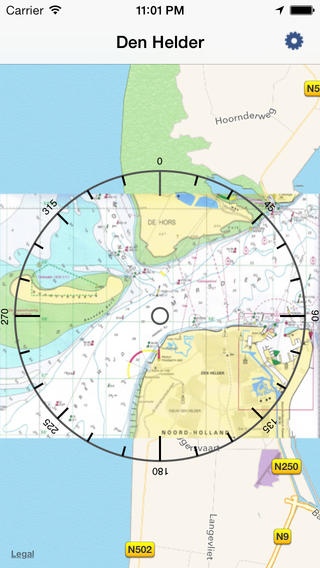
What is Sea Map?
Sea Map is a map viewer that supports both online Maps and offline Open Sea Maps for planning and light navigation purposes. Check www.openseamap.org for the quality and availabilty of the maps.
Sea Map comes with a preinstalled set of community created open source navigational maps which can be used, even when you have no data network available.
This means that you can navigate, without the roaming charges that come with the use of online maps.
But Sea Map does not just support any map, it supports sea maps! Since means you have additional features such as lights and buoy markers that are not visible on the normal map.
What can and can't you do with Sea Map?
Every mariner knows you should use certified charts for navigation, and since the nature of community charts is by definition not official, you should not rely on Sea Map to be your primairy and only source of chart material.
That beeing said, Sea Map is a great utility and the power of open source community maps may very well lead to better and faster updated charts for particular areas.
You can use Sea Map to check features and to quickly find your way, and it will prove to become your chart table in your pocket.
Why is there no (good)map for my region?
Sea Map is a viewer for community sea charts. If there is no map for your region, you can help in creating it by joining openseamap. Check for quality and availability on their website, it is under rapid community development.
How can I get a better/newer map?
You can join the mailing list and request maps from there. We follow the releases of openseamap closely and will provide updates (free of charge) with the latest maps. You can also send in your maps and they will be added to the server for the benefit of all.
What Maps are in SeaMap?
Baltic Harbors/Burg Fehmarn
Baltic Harbors/Darlowko
Baltic Harbors/Faborg
Baltic Harbors/Gedser Lystbadhaven
Baltic Harbors/Heiligenhafen
Baltic Harbors/Marina Kroslin
Baltic Harbors/Marstal
Baltic Harbors/Nykoebing Falster
Baltic Harbors/Rhoenne
Baltic Harbors/Rostock
Baltic Harbors/Rostock Hohe Duene
Baltic Harbors/Stralsund
Baltic Harbors/Wolgast
Baltic Sea/Ahus
Baltic Sea/Apenrade Fjord
Baltic Sea/Baring Vig
Baltic Sea/Bodden Zingst
Baltic Sea/Bornholm
Baltic Sea/Danish South Sea
Baltic Sea/Darlowko Rowi
Baltic Sea/Falsterbo Channels
Baltic Sea/Fehmarn Sund
Baltic Sea/Finnish Sea
Baltic Sea/Flensburg Fjord
Baltic Sea/Gedser Dierhagen
Baltic Sea/Gedser Ruegen
Baltic Sea/Greifswalder Bodden
Baltic Sea/Grosser Belt
Baltic Sea/Grosser Belt South
Baltic Sea/Guldborgsund
Baltic Sea/Helsinki
Baltic Sea/Karlskrona
Baltic Sea/Kieler Bucht
Baltic Sea/Koege Malmoe
Baltic Sea/Kolberg Darlowko
Baltic Sea/Lillebaelt
Baltic Sea/Luebecker Bucht
Baltic Sea/Moen
Baltic Sea/Moen Bornholm
Baltic Sea/North Eastern Baltic Sea
Baltic Sea/Northern Ostsea
Baltic Sea/Peene Strom Achterwasser
Baltic Sea/Rowi Puck
Baltic Sea/Rowi Wladystawono
Baltic Sea/Ruegen
Baltic Sea/Simrishamm
Baltic Sea/Smalandsfarwandet
Baltic Sea/Southern Ostsea
Baltic Sea/Stettiner Haft Oder
Baltic Sea/Sund
Baltic Sea/Trelleborg
Baltic Sea/Wismar Rostock
Baltic Sea/Wollin
Baltic Sea/Wollin Kolberg
Baltic Sea/Ysted
Requires iOS 6.1 or later. Compatible with iPhone, iPad, and iPod touch.
About SeaMap Baltic
The company that develops SeaMap Baltic is Chris Lukassen. The latest version released by its developer is 2.0.0.
To install SeaMap Baltic on your iOS device, just click the green Continue To App button above to start the installation process. The app is listed on our website since 2011-02-05 and was downloaded 0 times. We have already checked if the download link is safe, however for your own protection we recommend that you scan the downloaded app with your antivirus. Your antivirus may detect the SeaMap Baltic as malware if the download link is broken.
How to install SeaMap Baltic on your iOS device:
- Click on the Continue To App button on our website. This will redirect you to the App Store.
- Once the SeaMap Baltic is shown in the iTunes listing of your iOS device, you can start its download and installation. Tap on the GET button to the right of the app to start downloading it.
- If you are not logged-in the iOS appstore app, you'll be prompted for your your Apple ID and/or password.
- After SeaMap Baltic is downloaded, you'll see an INSTALL button to the right. Tap on it to start the actual installation of the iOS app.
- Once installation is finished you can tap on the OPEN button to start it. Its icon will also be added to your device home screen.
Program Details
System requirements
Download information
Pricing
Version History
version 2.0.0
posted on 2011-02-05
Disclaimer
Official App Store Link
We do not host SeaMap Baltic on our servers. We did not scan it for viruses, adware, spyware or other type of malware. This app is hosted by Apple and passed their terms and conditions to be listed there. We recommend caution when installing it.
The App Store link for SeaMap Baltic is provided to you by apps112.com without any warranties, representations or guarantees of any kind, so access it at your own risk.
If you have questions regarding this particular app contact the publisher directly. For questions about the functionalities of apps112.com contact us.
